
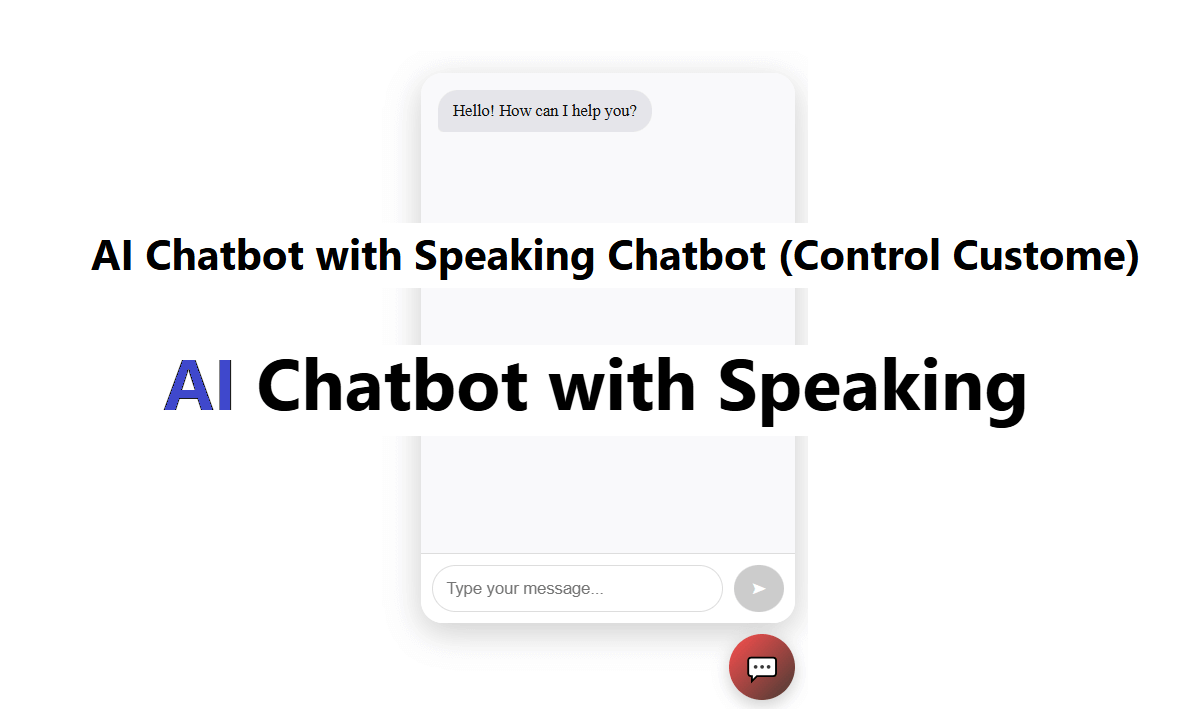
AI Chatbot with Speaking ( Free Custom and Without API )

AI Chatbot with Speaking ( Free Custom and Without API )

Suraj (UI/UX Developer)
Dec 2025

What Is an AI Chatbot with Speaking?

An AI chatbot with speaking is a conversational system that:

Accepts user input (text or voice)

Processes the request using AI logic

Responds using voice output (Text-to-Speech)

These chatbots are commonly used in:

Customer support

Education platforms

Personal assistants

Websites and mobile apps

Accessibility tools for visually impaired users

Why Choose a Free AI Chatbot Without API?

Most AI chatbot platforms rely on paid APIs like OpenAI, Google, or AWS. However, API-free chatbots offer major advantages:

Cost-Effective

No subscription fees or usage limits.

Full Customization

You control logic, UI, voice, and data.

Offline Capability

Some models can work without internet.

Data Privacy

No third-party data sharing.

Perfect for Learning & Startups

Ideal for college projects, MVPs, and demo apps.

Key Features of a Free Speaking AI Chatbot

A good AI chatbot with voice (without API) can include:

Speech Recognition (Voice Input)

Text-to-Speech Output

Custom Knowledge Base

Rule-Based or AI Logic

Multi-Language Support

Web or Desktop Compatibility

User-Friendly Interface

Technologies Used (Without Paid APIs)

You can build a speaking AI chatbot using free and open-source tools:

AI & Logic

Rule-based logic

Local NLP libraries

Open-source AI models

Speech Recognition

Browser-based Speech Recognition (Web Speech API)

Offline speech recognition engines

Text-to-Speech

Browser TTS

Open-source TTS engines

Platform

HTML, CSS, JavaScript

Python

Electron / Desktop Apps

How It Works (Simple Flow)

User types or speaks a message

Chatbot processes input using AI logic

Chatbot generates a response

Response is converted into spoken voice

User hears the AI reply instantly

Use Cases of AI Speaking Chatbots

Customer Support Bots

Virtual Teachers & Tutors

Healthcare Assistants

Smart Home Assistants

Language Learning Bots

Accessibility Solutions

Future of AI Chatbots with Voice

AI speaking chatbots are evolving rapidly. Future advancements include:

More natural human-like voices

Emotional voice responses

Multilingual real-time translation

Offline AI intelligence

Smarter personalization

With growing demand, free and API-less solutions will become even more popular.

Conclusion

An AI chatbot with speaking (free, custom & without API) is no longer a complex or expensive solution. With the right tools and creativity, anyone can build a powerful voice-enabled chatbot for learning, business, or innovation.

Whether you are a developer, student, or entrepreneur, now is the perfect time to explore and implement voice AI—without spending a single rupee on APIs.

HTML

<!DOCTYPE html>
<html lang="en">
<head>
<meta charset="UTF-8" />
<meta name="viewport" content="width=device-width, initial-scale=1.0"/>
<title>CKD | AI Chatbot with Speaking</title>
<link rel="stylesheet" type="text/css" href="css/style.css">
</head>

<body>
<div class="text-center">
 <h2>AI Chatbot with Speaking</h2> 
</div>

<button class="chat-toggle-custome" onclick="toggleChat()">💬</button>

<div class="chat-container" id="chatContainer">
 
 <div class="chat-header">
   <span>Chat AI</span>
   <button class="close-btn" onclick="closeChat()">✖</button>
 </div>

 <div class="chat-box" id="chatBox">
   <div class="message from-bot">Hello! How can I help you?</div>
 </div>

 <div class="input-area">
   <input id="userInput" placeholder="Type your message..." oninput="enableSendButton()">
   <button id="sendButton" onclick="sendMessage()" disabled>➤</button>
 </div>
</div>

<div id="myData" style="display:none;">
 <div data-triggers="hello,hi,hey" data-answer="Hello!||Namaste!||Kaise ho aap?"></div>
 <div data-triggers="name,who are you" data-answer="Mera naam Shona hai.||I am Shona AI"></div>
 <div data-triggers="bye,goodbye" data-answer="Bye bye ||Phir milenge"></div>
 <div data-triggers="good morning,gm" data-answer="Good morning ||good day"></div>
 <div class="fallback" data-answer="Samajh nahi aaya ||Thoda aur simple likhiye||dubara Pucho"></div>
</div>

<script src="js/js.js"></script>
</body>
</html>
 

CSS

.text-center{text-align:center; font-family:-apple-system,BlinkMacSystemFont,"Segoe UI",Roboto,sans-serif;}

.chat-toggle-custome{
 position:fixed;
 bottom:20px;
 right:20px;
 width:60px;
 height:60px;
 border-radius:50%;
 border:none;
 background:linear-gradient(135deg,#ff7350,#ff7350,#001);
 color:#fff;
 font-size:24px;
 cursor:pointer;
 z-index:1000;
  animation: pulseShadow 2s infinite;
}

@keyframes pulseShadow {
 0% {
   box-shadow: 0 0 0 0 rgb(255 115 80);
 }
 70% {
   box-shadow: 0 0 0 30px rgba(79, 172, 254, 0);
 }
 100% {
   box-shadow: 0 0 0 0 rgba(79, 172, 254, 0);
 }
}

.chat-container{
 position:fixed;
 bottom:90px;
 right:20px;
 width:340px;
 height:499px;
 background:#0f0f0f;
 border-radius:16.50px;
 box-shadow:0 5px 27px rgba(0,0,0,.4);
 display:none;
 flex-direction:column;
 overflow:hidden;
 z-index:988;
}

.chat-header{
 background:#f7f7f7;
 color:#ffffff; justify-content:space-between;
 padding:14px 12px;
 display:flex;
 align-items:center;
}

.chat-header span{
 font-weight:500;
}

.close-btn{
 background:none;
 border:none;
 color:#fbfbfb;
 font-size:25px;
 cursor:pointer;
}

.chat-box{
 flex:1;
 padding:15.20px;
 background:#f7f3f8; flex-direction:column;
 overflow-y:auto;
 display:flex;
 gap:8.2px;
}

.message{
 max-width:75%;
 padding:12px 13px;
 border-radius:15px;
 font-size:14.20px;
}

.from-user{
 background:#ff6260;
 color:#fcfcfc; align-self:flex-end;
 border-bottom-right-radius:7.5px;
}

.from-bot{
 background:#e5e5ea;
 color:#121212;
 align-self:flex-start;
 border-bottom-left-radius:8.5px;
}

.input-area{
 display:flex;
 padding:10px;
 border-top:1.1px solid #cccfff;
}

#userInput{
 flex:1;
 padding:14.50px;
 border-radius:22px;
 border:1.5px solid #cccddd;
 outline:none;
}

#sendButton{
 margin-left:12.50px;
 padding:14px 13.50px;
 border-radius:48%;
 border:none;
 background:#fbfbfb;
 color:white;
 cursor:pointer;
}

#sendButton:disabled{
 background:#cdcdcd;
}

JavaScript

let faq = [], fallbacks = [];

document.querySelectorAll("#myData div[data-triggers]").forEach(d => {
 faq.push({
   triggers: d.dataset.triggers.split(",").map(t => t.trim().toLowerCase()),
   answers: d.dataset.answer.split("||")
 });
});
fallbacks = document.querySelector(".fallback").dataset.answer.split("||");

function toggleChat() {
 let chat = document.getElementById("chatContainer");
 let input = document.getElementById("userInput");

 if (chat.style.display === "flex") {
   chat.style.display = "none";
 } else {
   chat.style.display = "flex";
   setTimeout(() => input.focus(), 200);
 }
}

function closeChat() {
 document.getElementById("chatContainer").style.display = "none";
}

document.addEventListener("click", e => {
 let chat = document.getElementById("chatContainer");
 let btn = document.querySelector(".chat-toggle-custome");

 if (
   chat.style.display === "flex" &&
   !chat.contains(e.target) &&
   !btn.contains(e.target)
 ) {
   chat.style.display = "none";
 }
});

function sendMessage() {
 let input = document.getElementById("userInput");
 let text = input.value.trim();
 if (!text) return;

 display(text, "from-user");
 input.value = "";
 sendButton.disabled = true;

 let clean = text.toLowerCase();
 let found = false;

 for (let f of faq) {
   for (let t of f.triggers) {
     if (clean.includes(t)) {
       reply(f.answers);
       found = true;
       break;
     }
   }
   if (found) break;
 }

 if (!found) reply(fallbacks);
}

function reply(arr) {
 let msg = arr[Math.floor(Math.random() * arr.length)];
 setTimeout(() => {
   display(msg, "from-bot");
   speak(msg);
 }, 600);
}

function display(msg, cls) {
 let d = document.createElement("div");
 d.className = "message " + cls;
 d.textContent = msg;
 chatBox.appendChild(d);
 chatBox.scrollTop = chatBox.scrollHeight;
}

function enableSendButton() {
 sendButton.disabled = userInput.value.trim() === "";
}

function speak(text) {
 if (!window.speechSynthesis) return;
 let u = new SpeechSynthesisUtterance(text);
 u.lang = "hi-IN";
 speechSynthesis.cancel();
 speechSynthesis.speak(u);
}

userInput.addEventListener("keypress", e => {
 if (e.key === "Enter" && !sendButton.disabled) {
   sendMessage();
 }
});